eSafety Health & Safety software

Health & Safety App for New Zealand Businesses

Built for New Zealand trade crews, contractors and growing businesses managing workers, jobs and multiple sites. Manage inspections, incidents, JSAs, SWMS, SOPs, Risk IDs, training and safety meetings from your phone, tablet or computer. Standard includes 50 active workers and 5 App logins, with expansion packs as your team grows. Keep inspection issues, incident details and meeting follow-ups connected, with evidence easier to find for SiteWise, Tōtika, IMPAC and SHE prequalifications.

Used the old eSafety App? Add your company to get started with the new App.
28 days free — no card required Lite: 2 App logins and 15 active workers Standard: 5 App logins and 50 active workers, with expansion packs
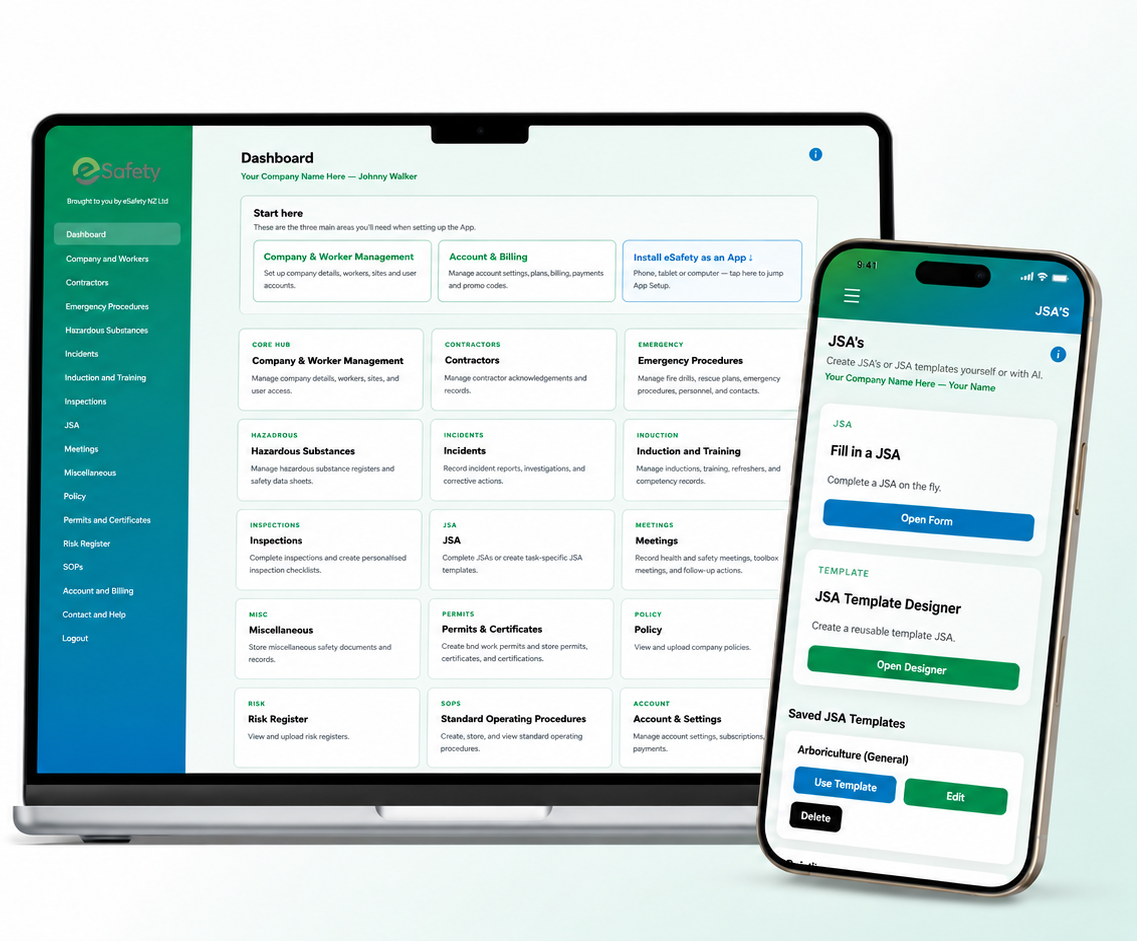
eSafety App dashboard shown on laptop and mobile
Easy to get started

Get up and running in 3 easy steps

No complicated setup project. Create your company, add your people and choose who gets access.

1

Create your company and log in

Enter your company details, create your password and log in.

2

Company & Workers

Add your company logo if you have one, then add your workers.

3

User Access

Choose the workers who need access and send their email invitations.

That’s it — you’re up and running
Easy to start. Built to grow with your team. Get started on your own or set up multiple workers, sites and App users from day one. Add more capacity as your business grows.
No App Store download required

eSafety is a web app

eSafety is installed from your browser, so you will not find it in the Apple App Store or Google Play. Create your company, log in through your browser, then add eSafety to your Home Screen. On a computer, you can add it to your desktop, taskbar or Dock. Once installed, eSafety opens from its own icon like a normal app.

How do I install eSafety on my device? Simple instructions for iPhone / iPad, Android, Windows and Mac.

Apple — iPhone / iPad (Safari)

  1. Open eSafety in Safari and log in.
  2. Tap the Share button — the square with the arrow pointing up.
  3. Tap Add to Home Screen.
  4. Make sure Open as Web App is turned on, then tap Add.
If Add to Home Screen is missing, scroll to the bottom of the Share list and use Edit Actions. Do not use the browser inside an email or message app.

Android — Chrome

  1. Open eSafety in Chrome and log in.
  2. Tap the three-dot menu ⋮.
  3. Tap Install and create shortcut.
  4. Choose Install. Do not choose Create shortcut.

Windows — Chrome

  1. Open eSafety in Chrome and log in.
  2. Click the three-dot menu ⋮.
  3. Choose Cast, save, and share.
  4. Choose Install page as app, then Install.
If Chrome shows an Install icon in the address bar, you can use that instead.

Mac — Safari

  1. Open eSafety in Safari and log in.
  2. At the top of the screen, click File.
  3. Choose Add to Dock.
  4. Click Add.
Add to Dock requires a supported version of macOS. Chrome can also install eSafety as an app.

Offline Field Use: currently supported on Android devices only.

IT'S HERE!

Need a task-specific JSA, SOP, Risk ID or SWMS right now?

You're on the job, the work needs to get moving, and the last thing you want is to spend hours building safety paperwork from scratch. eSafety AI Assist can create task-specific JSA, SOP, Risk ID and SWMS working drafts directly in the App — ready for you to review, adjust and approve. Check out the demos below.

$1.15 incl GST per AI credit 10 credits for $11.50 · JSA, SOP and Risk ID use 1 credit · SWMS uses 2 credits · each paid AI session includes one regeneration

AI-generated safety content is a draft and must be checked by a competent person before it is approved or used for the job.

See eSafety in action

A quick look at how the app works on the job

No eSafety policy yet? No problem.

Start with 28 days free

Create your company and start using eSafety without entering a payment card. The ordinary free start uses the Lite allowance and gives you time to set up the company, add your people and start using the day-to-day safety tools.

28 days free on Lite 2 billable App users Up to 15 active workers 64GB included storage JSAs, SOPs, inspections, incidents, training, contractors, meetings and the other app tools shown below No payment card required just to create the company and begin the free period One free AI Assist preview is available; paid or promo AI credits can be added separately
28 days free Lite: up to 15 active workers · 2 App users included · maximum 4 with add-ons · 64GB storage After the free period, choose whether to continue with paid monthly billing.
Already have an eSafety policy?

Get an extended free trial

If your business already has an eSafety Health & Safety Policy, contact us for a promo code and start with a longer free period.

Current eSafety policy less than 2 years old
12 weeks free

Lite plan · up to 15 active workers · 2 App users included · maximum 4 with add-ons · 64GB storage

eSafety policy 2 years old or more
8 weeks free

Lite plan · up to 15 active workers · 2 App users included · maximum 4 with add-ons · 64GB storage

Promo code required. Contact eSafety and we’ll provide the appropriate code for your policy.
Health & Safety App pricing Lite, Standard, extra users and AI Assist credits.

eSafety App Lite is $28.75 per month including GST for up to 15 active workers, 2 included App users and 64GB storage. Lite allows up to 2 additional individual App users at $2.88 each per month, for a maximum of 4 logins. Standard is $46.00 per month including GST for up to 50 active workers, 5 included App users and 128GB storage. Each additional Standard 5-user pack costs $11.50 per month including GST and adds 5 App users, 20 active worker spaces and 10GB storage.

Standard
$46.00 / month
NZD · GST included
  • 5 billable App users included
  • Up to 50 active workers
  • 5-user packs add 5 App users + 20 worker spaces + 10GB
  • 128GB included storage
  • AI Assist can be added separately
Create Company
Workers and App users are different. Worker records hold people's training, induction and safety information; App users are the people authorised to log in. Lite allows up to 15 active workers with 2 included App users and a maximum of 4 logins. Standard allows up to 50 active workers with 5 included App users. Each additional Standard 5-user pack adds 20 active worker spaces as well as 5 App logins.

Need more App users?

+1 billable user — $2.88/month Single-user add-on · GST included · Lite allows up to two, for a maximum of 4 Lite App logins · Standard single-user options remain available · individual add-ons do not increase worker allowance
+5 billable users +10GB — $11.50/month Five-user pack · GST included · Standard only · adds 5 App users, 20 active worker spaces and 10GB storage

AI Assist credits

AI Assist is optional and works with JSAs, SOPs, Risk IDs and SWMS. Credits are company-level and roll over until used.

One-off AI credit pack
$11.50
10 AI credits · pay once · GST included · buy another pack whenever you need it.
Recurring AI Assist pack
$11.50 / month
10 AI credits each normal monthly renewal · GST included · added to the normal eSafety Stripe subscription.

One AI credit covers the first successful JSA, SOP or Risk ID draft and one regeneration of that same draft. A SWMS AI session uses 2 credits and also includes one regeneration of that same SWMS draft. Failed, malformed or too-broad first generations do not use credits. AI output remains a draft and must be checked by a competent person before use.

Inside eSafety

Built around the work you actually do

From inspections and JSAs / SWMS to inductions, hazardous substances, training and reminders, eSafety keeps your day-to-day safety work together.

See screenshots from inside eSafety Real App screens: Dashboard, reminders, JSA / SWMS, inspections, training and hazardous substances.
Dashboard Main dashboard with access to safety management modules and company activity. Open this page in eSafety ↗
Connected safety records

Make prequalification evidence easier to find

Preparing for SiteWise, Tōtika, IMPAC or SHE? Assessors want more than an inspection or incident report. You also need to show what was discussed and what happened next. eSafety helps bring the relevant information into safety meetings, with follow-up actions and supporting records kept together.

✓ Inspections: Load open inspection issues into meetings, review recommended fixes and record when they're completed.
✓ Incidents: Bring in new incidents and near misses, plus older reports still pending investigation approval.
✓ Meeting follow-ups: Carry unfinished actions forward and keep attendees, signatures and assigned tasks recorded.
✓ Evidence in one place: Keep signed meeting PDFs, attachments and your uploaded company policies and risk registers alongside day-to-day records.
Everyday safety management

The tools you need, without the maze

Dozens of ready-to-use forms in one connected system, with multi-user access, company sites and worker records. Create personalised inspection, induction, contractor acknowledgement and JSA templates when you need them. Complete the paperwork on the phone at the job, not at the kitchen table at 8pm.

See all eSafety tools & features Open the full list when you want the detail — without making the page a mile long.

Company & worker management

Keep your company, sites, workers, contacts and user access together, with worker details ready to use throughout the app.

Includes: company profile · logo · sites · workers · contacts · email invitations · access levels · multi-company access.

Inspections & issue tracking

Complete workplace, site and vehicle inspections, record problems as you find them and keep the follow-up actions visible.

Includes: custom inspection checklists · photos · corrective actions · inspection history · approved PDFs.

JSAs & Job Pre-Starts

Build job-specific JSAs and reusable templates. Run quick Job Pre-Starts to check changes, risks and controls, then open a JSA or saved template if more planning is needed.

Includes: job steps · hazards · risk ratings · controls · PPE · personnel · crew sign-off · photos · optional AI Assist.

Safe Work Method Statements (SWMS)

Build detailed SWMS for higher-risk work and link existing contractor documents, training records and hazardous substance information straight into the statement.

Includes: high-risk work triggers · job steps and controls · risk ratings · PPE · emergency / rescue arrangements · worker consultation · contractor acknowledgements · supporting documents · signatures · draft and final PDFs · optional AI Assist.

Standard Operating Procedures

Create detailed SOPs for the work you actually do, with AI Assist available when you want a practical first draft to work from.

Includes: risks · preparation checks · operating steps · emergency procedures · PPE · trained and permitted users · attachments.

Risk ID & Risk Assessment

Record a hazard or safety concern, assess the initial risk, select controls using the hierarchy of controls, then reassess the residual risk and manage follow-up actions.

Includes: optional AI Assist using 1 credit · initial and residual risk ratings · control hierarchy · PPE · action plan · signatures · attachments · management close-out · locked final PDF.

Incidents & near misses

Record what happened, investigate it properly and keep the corrective and preventative actions with the incident record.

Includes: incident reports · near misses · investigation · classifications · serious-harm information · actions · photos · Incident Register.

Induction, training & competency

Keep worker inductions, training and competency evidence organised without digging through filing cabinets or separate spreadsheets.

Includes: custom induction checklists · worker and trainer signatures · Competency Register · External Training Register · Training Chart.

Contractor management

Send a contractor acknowledgement by secure link so the contractor can complete the checklist, upload files, sign it and send it back.

Includes: contractor register · custom acknowledgement checklists · site records · signatures · supporting files · internal approval.

Plant, equipment & vehicles

Keep important plant and vehicle information alongside the inspections and records that relate to it.

Includes: Plant, Equipment & Vehicle Register · registration · WOF / COF · RUC information · compliance due dates · inspection history.

Dashboard & configurable email reminders

Keep expiry, renewal and service dates visible on the Dashboard. Level 4 users can choose daily or weekly reminder emails, set their preferred day and NZ delivery time, or turn emails off. No email is sent when nothing needs attention.

Includes: SDS expiry · external training expiry · servicing · registration · WOF / COF · Test & Tag · personal email schedules.

Meetings & toolbox talks

Load outstanding inspection issues, relevant incidents and unfinished previous actions into safety meetings — then record discussions, follow-ups and sign-off.

Includes: attendees and signatures · previous minutes · new business · assigned actions · inspection issue close-out · incident and near-miss summaries · approved PDFs.

Hazardous substances

Keep hazardous substance information and Safety Data Sheets organised by site, with review information easy to find.

Includes: Hazardous Substance Register · SDS files · site records · review dates · expiry information · review history · search.

Emergency procedures

Keep the emergency plans, people, drills and rescue information your team may need in one place.

Includes: emergency plans · contacts · safety representatives · fire wardens · first aiders · fire drills · Rescue From Heights Plans · sign-off.

Permits & certificates

Create formal work permits and certificates, capture authorisation and signatures, then keep the completed record with the job evidence.

Includes: Hot Works Permits · Scaffold Hand-Over Certificates · files · photos · draft and approved PDFs · emailing completed records.

Digital signatures, approvals & PDFs

Move a safety record from draft through sign-off and approval without having to print it, scan it and file it somewhere else.

Includes: digital signatures · attendee sign-off · draft saving · draft PDFs · final approval · locked approved records · printable PDFs · email · attachments.

Policies, risk registers & records

Upload your existing company policies, risk registers and other H&S documents so they sit alongside your day-to-day safety records in one place.

Upload: company policies · risk registers · safety documentation · supporting records.

Connected safety information

Records work together to help show what was identified, discussed and followed up, rather than leaving the evidence in separate forms.

Examples: workers and sites reused across forms · vehicle inspections associated with registers · open inspection issues and incident details pulled into meetings · unfinished actions carried forward.

Ready to make health & safety easier to manage?

Create your eSafety company and start with Lite free for 28 days — up to 15 active workers, 2 App users and 64GB storage included. Lite can be expanded to a maximum of 4 App logins with up to two individual user add-ons.

No payment card is required simply to create your company and begin the standard free period.